

Description
Beach Theme for Chrome – Relaxing Maldives View
Overview
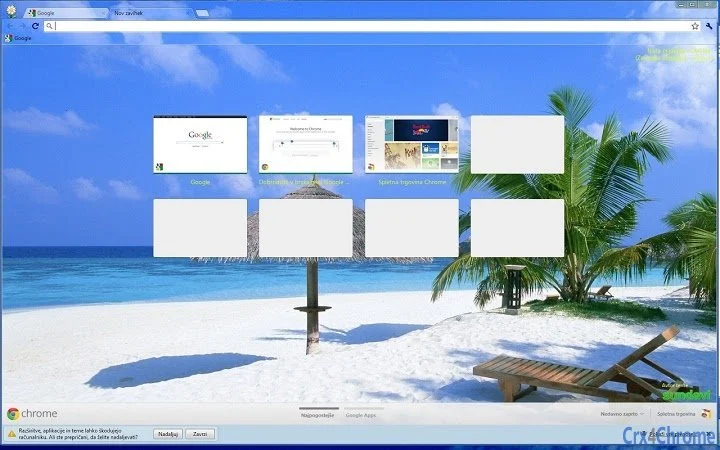
The Beach Theme for Chrome is a visually immersive desktop enhancement designed for users who appreciate serene coastal scenery. Tailored for screens with a 16:9 aspect ratio and up to 1920x1080p resolution, this theme transforms the Chrome browser’s appearance with a calming beach scene from the Maldives. It serves as a digital backdrop that can help reduce visual fatigue and create a more pleasant browsing environment. The theme is ideal for remote workers, students, or anyone seeking a moment of tranquility during daily computer use.
Designed with simplicity in mind, the theme does not alter browser functionality—its sole purpose is aesthetic. It is suitable for both casual users and professionals who value a personalized digital workspace. The developer did not provide additional background information, and no specific user demographics were mentioned. However, its focus on visual relaxation suggests it may appeal to users seeking a mental break from high-stress digital environments.
Real-world usage scenarios include using the theme during long work sessions, study breaks, or leisure browsing. It is not intended for productivity automation or content creation, but rather to enhance user mood and visual comfort through a carefully selected image. The theme integrates seamlessly into the Chrome browser interface, offering a subtle yet effective way to personalize the digital experience.
Key Features & Capabilities
- Immersive Beach Visuals – Features a high-resolution image of a Maldivian beach, optimized for 16:9 displays up to 1920x1080p, ensuring sharp and vibrant visuals without distortion.
- Browser Integration – Applies directly to the Chrome browser interface, altering the new tab page and toolbar appearance while preserving full functionality.
- Resolution Optimization – Specifically designed for 1920x1080p screens, ensuring the image fits perfectly without stretching or cropping.
- Lightweight Design – At 1.5 MB, the theme has minimal impact on system resources, making it suitable for devices with limited storage.
- Easy Installation – Available through the Chrome Web Store with a single-click install process, requiring no technical setup.
Users can apply the theme to create a calming atmosphere during work or relaxation. For example, a remote worker might use it during video calls to maintain focus and reduce mental fatigue. A student studying late at night could benefit from the soothing visuals to improve concentration. The theme does not affect browsing speed, security, or performance—its sole role is visual enhancement.
User Interface, Workflow & Performance
The user interface of the Beach Theme for Chrome is entirely dependent on the Chrome browser’s default layout. The theme modifies only the background of the new tab page and the toolbar, leaving menus, bookmarks, and navigation intact. Navigation remains intuitive, as users interact with the browser as usual, with no additional layers or controls introduced.
Workflow efficiency is preserved since the theme does not interfere with browsing behavior. Users can switch between tabs, open new windows, and manage bookmarks without disruption. The theme’s design is static, meaning it does not include animations or dynamic elements that could impact performance.
The developer did not specify resource usage details. Performance observations are based on general software behavior patterns. The theme is expected to consume minimal CPU and RAM, consistent with standard Chrome themes. Stability is assumed to be high, as it is a simple visual overlay with no background processes. No issues related to crashes or conflicts were reported in the provided information.
Compatibility & System Requirements
The Beach Theme for Chrome is compatible with Windows and Mac operating systems. It is designed for Chrome browsers running on devices with a 16:9 aspect ratio and up to 1920x1080p resolution. The installation size is 1.5 MB, which is compact and suitable for most modern systems.
Exact system requirements were not listed. Compatibility information was partially provided. The theme does not require specific hardware or advanced configurations. It is intended for use on standard desktop and laptop computers. No additional software or plugins are needed for installation or operation.
Pros and Cons
Pros
- Visually appealing and relaxing beach scene from the Maldives
- Optimized for 1920x1080p screens with 16:9 aspect ratio
- Lightweight at only 1.5 MB
- Free to download and use
- Simple installation via Chrome Web Store
Cons
- Only available for Chrome browser
- No dynamic or interactive elements
- Does not support higher resolutions beyond 1920x1080p
- Minimal customization options
- Theme is static and does not change over time
FAQ Section
Is the Beach Theme for Chrome available for all browsers?
The theme is specifically designed for Google Chrome and is not compatible with other browsers such as Firefox, Edge, or Safari.
Can I use this theme on a monitor with a resolution higher than 1920x1080p?
The theme is optimized for 1920x1080p screens. While it may still display on higher-resolution monitors, it is not guaranteed to fit perfectly and could appear stretched or cropped.
Is the theme safe to install?
Yes, the theme is available through the official Chrome Web Store and does not include malicious code. It only modifies the visual appearance of the browser.
How often does the theme update?
Updates are not specified. The current version is 1.0, and no automatic update mechanism was mentioned.
Can I use this theme offline?
Yes, once installed, the theme functions fully offline. No internet connection is required to view or use the theme.
Final Thoughts & CTA
The Beach Theme for Chrome delivers a simple yet effective way to personalize your browsing experience with a tranquil Maldivian beachscape. Its focus on visual comfort and aesthetic appeal makes it ideal for users seeking a mental reset during long sessions. While it lacks advanced features, its lightweight design, free access, and seamless integration into Chrome make it a worthwhile addition for anyone wanting a peaceful digital environment.
It is particularly beneficial for remote workers, students, and digital creatives who spend extended time in front of a screen. The theme enhances mood without compromising performance or security. With its clean design and no hidden costs, it stands out as a reliable, stress-free enhancement.
Download Beach Theme for Chrome now and transform your browser into a serene escape.
Guides & Tutorials for Beach in the Maldives Theme for Chrome
How to install Beach in the Maldives Theme for Chrome
- Click the Preview / Download button above.
- Once redirected, accept the terms and click Install.
- Wait for the Beach in the Maldives Theme for Chrome download to finish on your device.
How to use Beach in the Maldives Theme for Chrome
This software is primarily used for its core features described above. Open the app after installation to explore its capabilities.
User Reviews for Beach in the Maldives Theme for Chrome 0
No reviews found





